Page templates
Templates are written {{name|arg|key=value}} and may span several lines. A
template alone on a line becomes a block; one inside a sentence stays inline.
To show a template without running it, put it in backticks or a fenced block.
Sprites and slots
{{sprite|Cobblestone}}          icon plus a link, inline
{{sprite|Diamond|link=no}}      icon only, no link
{{sprite|Coal|text=fuel}}       icon with custom label
{{slot|Iron Ingot|3}}           one inventory slot holding a stack of 3
 Cobblestone
 Diamond
 3
A mob's sprite is its head, so {{sprite|Creeper}} gives  Creeper.
Pictures
{{gallery}}                     every picture of this page's subject, captioned
{{gallery|Wolf}}                every picture of another subject
A subject the game draws in more than one state has a picture of each, in
data/sprites.json under renders: a sheep in every fleece colour, a tame or
angry wolf, every painting. {{gallery}} shows them all, and the build warns
on a page whose subject has several and never shows them.
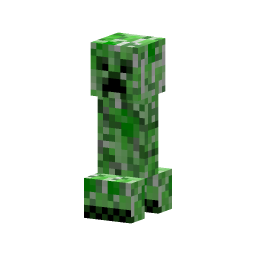 Normal
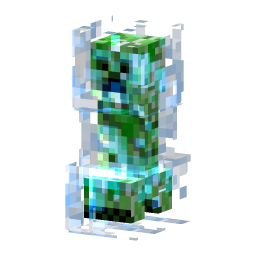 Charged
3D models
{{viewer|sapling-transmutation}}  the sapling transmutation machine
{{viewer|creeper}}                normal and charged creeper appearances
Viewers rotate by dragging and zoom by scrolling or pinching. Build layers are cumulative: the selected layer and everything below it are solid, while blocks above it remain as translucent edges. The highest layer shows the whole build. The fullscreen button expands the model together with its controls.
Each scene has its own viewer/scenes/<scene-id>.json file. Unknown IDs fail the
build. Scenes use only exported block models and frozen entity appearances; they
do not simulate redstone or tree growth. viewer/README.md describes scene
authoring and mesh regeneration.
Recipes
Called with no argument, these use the page's own subject and read the real recipes out of the game data.
{{crafting}}                    every recipe producing this page's subject
{{crafting|Furnace}}            every recipe producing a named thing
{{smelting|Stone}}              every smelting recipe producing it
{{used in|Cobblestone}}         every recipe that consumes it
{{recipe list}}                 every crafting recipe in the game
{{recipe list|type=smelting}}   every smelting recipe in the game
An explicit grid, for a recipe the data does not cover:
{{crafting
| pattern = ###/#X#/###
| # = Wooden Planks
| X = Diamond
| output = Jukebox
}}

Notes and boxes
{{stub}}                        marks the page as needing work
{{stub|block}}                  same, naming what kind of page it is
{{main|Crafting}}               "Main article: Crafting"
{{see also|Smelting}}           "See also: Smelting"
{{hatnote|This is about the block. For the item, see [[Sign]].}}
{{msgbox|type=warning|Careful.}}
type=notice, warning, error or stub.Data
{{id|Cobblestone}}              the numeric id, as code
{{id|Fern}}                     a subtype's id with its metadata: 31:2
{{id|block 68}}                 one id of several that share a name
{{list|blocks}}                 sortable table of every block
{{list|items}}                  every item
{{list|entities}}               every entity
{{list|light}}                  the blocks that give off light
{{list|opacity}}                the blocks with a hand-set opacity
{{list|food}}                   the items that heal
{{pagelist|namespace=biome}}    linked, sprite-led list of pages
Cobblestone's block id is 4, and a fern is 31:2.
Infoboxes
Infoboxes are automatic. If a page's title (or its subject) matches a block,
item or entity, the box builds itself from the extracted data. Its picture is
the subject's portrait where the game draws one -- every mob, the player, the
minecarts and the boat -- and its sprite otherwise; a sprite: in the
frontmatter overrides both. Add or override
rows from frontmatter:
infobox:
  Tool: Pickaxe
  Renewable: "No"
Set infobox: false to suppress it entirely.